Samsung Washer Error Codes: Complete California Guide — 4E, 5E, UE, DC, dE, OE and Every Code Explained
Your Samsung front-loader or top-loader just stopped mid-cycle and flashed a code. Here is exactly what each code means, what causes it in California’s specific water conditions, what you can fix yourself, and when the code means you need a technician.
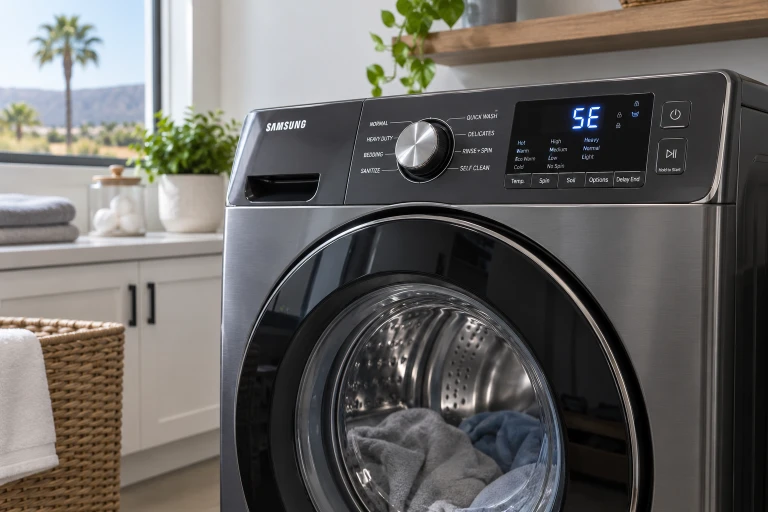
Samsung is among the most popular washing machine brands in California, particularly in newer construction and condo buildings throughout the Bay Area, LA Metro, and San Diego County. Their front-load WF series and top-load WA series both use an onboard diagnostic system that monitors dozens of sensors and displays alphanumeric error codes when something is wrong.
The challenge: Samsung’s error code documentation was written for the median US water condition of roughly 110–130 ppm. California’s water ranges from 50 ppm (SFPUC Hetch Hetchy in San Francisco) to 479 ppm (Ventura city groundwater). When your Samsung in Mission Viejo shows a 5E drain error, the root cause and the correct resolution are genuinely different from the same code on a machine in Sacramento — because water chemistry changes what’s restricting the pump.
This guide covers every Samsung error code you’re likely to encounter, with California-specific context for the most common ones. Bookmark it for the next time your display shows a code mid-cycle.
How Samsung Error Codes Work
Samsung washers display error codes on the LED panel when sensors detect an out-of-range condition. The code appears, the machine stops or pauses, and a notification may appear in the Samsung ThinQ app (on Bespoke and smart-home models).
Important distinction: Some codes indicate something you can fix immediately (redistribute an unbalanced load for UE); others indicate a component failure requiring professional service (3E motor fault, HE heating element failure). Most of California’s most frequent codes — 5E, 4E, OE — are water-chemistry related and fall somewhere in between: often DIY-resolvable with the right maintenance, sometimes requiring professional descaling.
Older vs. newer Samsung models: Samsung changed their error code naming between generations. Older models (pre-2015 roughly) use letter-number codes like 5C, 4C; newer models show 5E, 4E for the same fault. Both indicate identical issues — the letter just changed. If you have an older machine showing a C suffix where this guide shows E, the cause and fix are the same.
Smart reset first: For any error code that appears without obvious cause, unplug the machine for 60 seconds and restart. This clears temporary electronic glitches from the control board’s memory. If the code returns immediately, the underlying condition is genuine.
On WF series front-loaders: inside the door frame on a sticker, visible when the door is open. On WA series top-loaders: on a sticker on the back panel or inside the lid rim. The model number starts with WF (front-load) or WA (top-load) and determines exactly which error codes apply to your machine.
Not necessarily. Samsung ThinQ app connectivity errors (Wi-Fi, cloud sync issues) appear in the app without indicating hardware failure. If the machine is completing wash cycles normally, a ThinQ-only notification is a connectivity issue — not a mechanical fault. Genuine hardware errors appear on the machine’s physical display panel and interrupt operation. Try resetting ThinQ by removing and re-adding the appliance in the app before scheduling service.
Complete Samsung Error Code Reference
| Code | Old Code | What It Means | California Water Context | DIY or Pro? |
|---|---|---|---|---|
| 5E / SE | 5C | Drain error — water not draining | At 150–479 ppm: scale in pump filter or housing. At 50–120 ppm: debris only. | Often DIY (filter clean). Pro if housing scaled or pump fails. |
| 4E / 4C | 4C | Fill error — not filling with water | At 150+ ppm: calcified inlet screens are #1 cause. Also: kinked hose, closed valve. | DIY (screen descale, hose check). Pro if solenoid failed. |
| UE / Ub | E4 | Unbalanced load — spin interrupted | Not water-related. Load distribution issue or worn suspension on older machines. | DIY (redistribute). Pro if suspension components failed. |
| DC / dC | DC | Door or lid not closed/latched | Not water-related. Door lock assembly failure or obstruction preventing closure. | DIY (check for obstruction). Pro if door lock assembly failed. |
| OE / OC | OC | Overflow — too much water in drum | Stuck-open inlet valve (scale on valve seat) or failed water level pressure switch. | Pro. Overflow is a water damage risk — stop machine and call. |
| dE / DE | DE | Door error — won’t lock or unlock | Not water-related. Door lock wiring or assembly failure. | Pro. Door lock assembly replacement. |
| 3E / 3C | 3C | Motor error — tachometer or drive fault | Occasionally heat-related in Palmdale/IE garage installations in summer. | Pro. Motor or motor control board diagnosis required. |
| HE / HC | HC | Water temperature error | Also check: hoses reversed (4C2 code). Hot inlet delivering cold water or vice versa. | DIY (check hose connections). Pro if thermistor/heater failed. |
| 4C2 / 4E2 | — | Hot and cold hoses reversed | Installation error. Common after machine was moved or hoses reconnected. | DIY. Swap the hot and cold supply hoses at the machine inlet. |
| tE / tC | tC | Thermistor (temperature sensor) fault | Not water-related. Temperature sensor failure or wiring fault. | Pro. Thermistor replacement. |
| 1E / 1C | 1C | Water level pressure sensor fault | Also check: pressure hose between sensor and drum for kinks or scale blockage in CA hard water. | DIY (hose check). Pro if pressure switch failed. |
| LC / LC1 | — | Leak detected by base sensor | Genuine leak or condensation triggering sensor. In hard water, check pump housing for scale-induced micro-cracks. | Pro. Stop machine immediately — water damage risk. |
| Sud / 5D | — | Excess suds — too much detergent | In CA hard water, non-HE detergent or too much detergent creates persistent suds. Use HE detergent only. | DIY. Reduce detergent, run Rinse+Spin cycle to clear. |
| 9C1 | — | Electrical overvoltage or supply problem | Not water-related. Power supply or control board fault. | Pro. Electrical fault diagnosis. |
| bE / bC | — | Button stuck or control panel fault | Not water-related. Control panel or stuck button. | DIY (check button). Pro if control panel failure. |
| AE / AC | — | Communication error between components | Not water-related. Wiring harness or control board communication fault. | Pro. Internal wiring/board diagnosis. |
The Four Most Common Samsung Error Codes in California — Detailed
5E Drain Error — California’s Most Common Samsung Service Call
The 5E error (shown as SE or 5C on older models) means the machine cannot drain within its expected time window. A 5E that appears consistently on every cycle, rather than occasionally, is almost always a restriction in the drainage path rather than a pump motor failure — though pump motor failure can produce identical symptoms.
In California hard water cities (150–479 ppm): The pump filter accumulates a combination of mineral scale and physical debris (lint, coins, fabric fragments) between cleanings. At 200–280 ppm (Mission Viejo, Encinitas, Newport Beach range), a filter that isn’t cleaned quarterly develops enough scale to restrict drainage within 2–3 months. At 350–479 ppm (Ventura, Thousand Oaks), that timeline compresses to 6–8 weeks. Critically, even after filter cleaning, internal pump housing scale can continue to restrict the pump impeller — this is why 5E errors in California hard water cities often recur within weeks of a filter cleaning that appeared to solve the problem.
In California soft water cities (50–120 ppm: Sacramento, Bay Area EBMUD/SFPUC): The pump filter accumulates only physical debris with minimal scale. Annual cleaning for debris is appropriate. A 5E error after debris cleaning points directly to pump motor failure rather than housing scale — the diagnostic sequence is different.
Locate and access the pump filter
The pump filter access panel is at the lower front of the machine — a small rectangular cover that unclips or a full kick panel that snaps off. On WF series front-loaders it’s in the lower right corner. Place a shallow pan or folded towels underneath. There is usually a small emergency drain hose coiled inside — pull and uncap it to release residual water slowly before opening the main filter cap.
Remove and clean the filter
Turn the filter cap counter-clockwise slowly while holding the pan underneath. Pull the filter straight out. Remove physical debris by hand. For scale: soak in a citric acid solution (1 tablespoon per cup of warm water) for 15 minutes or in white vinegar for 30 minutes. The scale dissolves and rinses away. Don’t use abrasive tools on the mesh. Rinse thoroughly and reinstall finger-tight.
Run a Drain & Spin cycle to test
With the filter reinstalled, run a Drain & Spin cycle. If it completes without a 5E error, the filter was the cause. If the 5E returns within 4–8 weeks of a genuinely clean filter, internal pump housing scale is restricting flow in hard water cities, or the pump motor is failing in soft water cities. Either scenario requires professional service.
Establish the correct maintenance interval for your city’s water
At 50–120 ppm (Sacramento, Bay Area): clean for debris every 10–15 months. At 150–200 ppm (Antioch, Rancho Cucamonga): every 90–110 days with citric acid. At 200–280 ppm (Mission Viejo, San Diego County, Palmdale): every 75–90 days. At 280+ ppm (Burbank BWP, Ventura): every 60–75 days. Match your interval to your city, not a national average. See our complete filter cleaning guide for brand-specific instructions.
5E misdiagnosis pattern: The most common expensive misdiagnosis on Samsung 5E in California is pump motor replacement when the pump motor is fully functional and the actual cause is housing scale or a blocked filter. In California hard water at 200+ ppm, pump motor replacement should only be quoted after the filter has been confirmed clean and the housing has been professionally descaled and tested. Pump motor replacement on a working pump adds $155–$265 to an unnecessary repair. Always confirm the pump motor is actually failing before authorizing replacement.
4E Fill Error — California’s Inlet Screen Problem
The 4E error (old code: 4C) means the machine is not filling with water, or is filling too slowly. The most common cause in California’s moderately hard to very hard water cities is calcified inlet valve mesh screens — not a failed solenoid valve.
The inlet valve is located at the back of the machine where the supply hoses connect. Inside each inlet port sits a small stainless steel mesh screen designed to catch sediment. In California water at 150–280 ppm, these screens develop calcium carbonate calcification on a 12–18 month cycle. At 280–479 ppm, the cycle compresses to 8–12 months. A fully calcified screen restricts flow enough to trigger 4E before the solenoid coil itself fails.
Before descaling screens, always: Check that the water supply valves behind the machine are fully open (both hot and cold). A partially closed valve produces identical 4E symptoms. Confirm both hoses are not kinked or pinched.
To descale the inlet screens: turn off both water supply valves. Disconnect both supply hoses from the machine rear (have towels ready for residual water). Use needle-nose pliers to carefully pull the mesh screens straight out of the inlet ports. Soak in 10% citric acid solution or undiluted white vinegar for 15–20 minutes. Mineral deposits dissolve and rinse away. Reinstall screens, reconnect hoses hand-tight plus quarter-turn, restore water supply, test with a fill cycle. A 4E that clears after screen descaling — with the solenoid never touched — is the correct diagnosis.
Check the inlet hoses for kinks along their full length — a hose kinked behind the machine is easy to miss. Then descale the inlet screens as described above. If the 4E clears, screens were the cause. If it persists with clear screens and verified open supply valves, the inlet valve solenoid has failed and needs professional replacement. In California hard water, the correct diagnostic sequence is: supply valve → hose kinks → screen descale → solenoid test. Never skip to solenoid replacement without confirming the screens are clear.
4C2 (also shown as 4E2) means the water arriving at the hot inlet is not hot — specifically, it means the hot and cold supply hoses are reversed. The machine detects that what it expects to be hot water is arriving cold. Fix: turn off supply valves, disconnect both hoses, and swap them (the hose connected to your home’s hot supply should go to the machine’s hot inlet). This code often appears after a machine has been moved, reinstalled, or has had the hoses reconnected. It’s an installation error, not a component failure.
UE / Ub — Unbalanced Load
UE (Unbalanced Error) and Ub are the same fault — the machine detected the drum is too imbalanced for safe high-speed spin and stopped the cycle to prevent vibration damage. This is the most frequent Samsung code that has nothing to do with water chemistry.
Most common causes:
- Single heavy item: A single towel, jeans, or hoodie can form a clump that creates severe imbalance. Wash heavy single items with similar items to distribute mass.
- Mixed heavy and light items: A batch of jeans plus lightweight t-shirts creates uneven weight distribution. Separate by weight category.
- Underfilled drum: One or two items in a large drum have nowhere to balance themselves. Add more items or wash small loads on the mini/small load setting.
- Bedding and towels: Bulky items absorb water unevenly and are the most common UE trigger.
When UE is not about load balance: If a properly distributed, appropriately sized load consistently triggers UE on every spin cycle, the machine’s suspension system is the underlying issue. Worn suspension rods (on top-loaders) or shock absorbers (on front-loaders) allow excessive drum movement that triggers the balance sensor even with a well-distributed load. This requires professional diagnosis and replacement — it’s a mechanical wear failure, not a user error.
In Redondo Beach, Hermosa Beach, and South Bay condo buildings: UE-triggered vibration that is resolved by redistributing the load is normal. UE that occurs on every load regardless of composition, combined with unusually severe machine vibration on spin, suggests worn shock absorbers — particularly common in front-loaders at 8–12 years. Worn shocks also transmit vibration to adjacent condo units through slab floors — the sound and impact travel much farther than in single-family homes with wood subfloors.
DC / dE — Door Won’t Close or Lock
DC and dE both relate to the door. DC means the machine detected the door is not properly closed or latched before starting a cycle. dE is a door lock (interlock) electronic error during a cycle.
Immediate checks for DC:
- Check for clothing caught in the door seal at the bottom — even a thin sock prevents the door from sealing completely
- Inspect the door boot seal for tears or deformations (relevant if the machine has been making noise or showing water around the door)
- Check the door latch on the door itself for visible damage or misalignment
- On top-loaders: confirm the lid is closing fully and that no items are caught under the lid rim
When the door looks closed but the code persists: The door lock assembly has failed. This is an electronic interlock module inside the machine body that confirms the door is locked before allowing cycle operation. When it fails electronically, the machine reads the door as open regardless of actual position. Door lock assembly failure is the most common won’t-start failure on Samsung front-loaders at 5–9 years of use. Replacement cost: $130–$265 with labor. This is also the most commonly misdiagnosed won’t-start failure — incorrectly attributed to control board failure at 2–3× the cost. A working machine that simply won’t start because the door lock failed is not a board problem. Request written documentation of any board test before authorizing board replacement. See our won’t start diagnosis guide.
OE Overflow Error — Stop the Machine Immediately
OE (or OC on older models) means the water level sensor has detected more water than expected in the drum. This is a genuine overfill condition that carries real water damage risk — if the machine continues to fill unchecked, it will overflow onto your floor.
Action: Press Pause or Power immediately. Don’t open the door if the drum has significant water in it. Select Drain & Spin to drain first.
Most common causes:
- Stuck-open inlet valve: The solenoid has failed in the open position, allowing water to continue entering after the fill cycle should have stopped. In California hard water, mineral deposits on the valve seat can prevent the valve from sealing completely.
- Failed water level pressure switch: The pressure switch that tells the machine the drum is full has malfunctioned, so the machine doesn’t know to stop filling.
- Pressure hose blockage: The small hose connecting the pressure switch to the drum can accumulate scale in California hard water, preventing the switch from reading water level correctly.
OE is always a professional repair call. An overflow condition creates water damage risk to floors and subfloors beyond the appliance repair cost. See also: washer leaking guide.
Samsung error code won’t clear after troubleshooting?
Most 5E, 4E, OE, and dE codes in California hard water have specific root causes our technicians identify with the correct diagnostic sequence — not remote guessing by error code description alone. Written estimate before any work.
Sud Error — Excess Suds (Almost Always a Detergent Issue)
The Sud error (also shown as 5D on some models) means the machine detected excessive foam in the drum. It pauses the cycle and attempts to dissipate the suds before continuing. This is almost never a mechanical failure.
Causes in California:
- Non-HE detergent: Samsung front-loaders require HE (High Efficiency) detergent — look for the HE symbol on the bottle. Standard detergent produces 5–10× more suds than HE detergent in the same low-water environment.
- Too much HE detergent: The dosage markings on detergent caps are calibrated for national average water hardness (~130 ppm). In California soft water (50–100 ppm), you need 20–30% less than the cap marking. In very hard water (300+ ppm), some detergents require slightly more to counteract the mineral interference with surfactants.
- Detergent residue buildup: Months of over-dosing leaves residue in the drum and dispenser that continues to produce suds from the residue alone. A deep cleaning cycle with a Affresh tablet or citric acid clears the residue.
- Fabric softener in the detergent compartment: Liquid fabric softener is much more prone to excessive foam than detergent. Ensure it’s added to the fabric softener compartment (the symbol with a flower), not the main wash compartment.
Resolution: Let the machine complete its Sud-clearing cycle (it will drain and add water to dilute the foam). Don’t add more water manually. Switch to HE detergent and reduce dose by 20–30%. Run a cleaning cycle with a descaling tablet to clear residue. If Sud errors continue after switching to correct HE detergent at correct dose, the water level pressure switch may be malfunctioning — a professional repair.
Less Common Codes: 3E, tE, LC, bE, 9C1, AE
These codes appear less frequently but are worth knowing:
3E — Motor Tachometer Error
The 3E code indicates a motor speed sensor (tachometer/Hall sensor) fault. The motor isn’t reporting its rotation speed correctly. Occasionally in Palmdale, Lancaster, and other high-temperature Inland Empire garage installations, sustained summer heat (115–130°F garage temperatures) stresses motor electronics and produces 3E codes. If your 3E appears in summer in a garage installation, ventilation improvement may prevent recurrence after repair. Most 3E codes require professional motor or motor control board service.
tE — Thermistor (Temperature Sensor) Error
The tE code means the temperature sensor isn’t reading correctly. The thermistor monitors water temperature during the wash cycle. In California’s hardest water cities, the thermistor can accumulate scale where it contacts wash water, producing false temperature readings. Professional service required, but mention your water hardness to the technician.
LC / LC1 — Leak Sensor
LC codes mean the base tray leak sensor has detected water in the machine base. This is a genuine leak condition. Stop the machine immediately. In California hard water, check for pump housing scale-induced micro-cracks if the machine is older than 7 years. See our leaking washer guide.
bE — Button or Panel Error
bE means a button on the control panel is stuck or the panel is registering a continuous press. Check for buttons that feel physically stuck. If no button is physically jammed, the control panel has failed and requires replacement.
California Water Hardness and Samsung Error Code Frequency
| City | Water (ppm) | 5E Filter Interval | 4E Screen Interval | Most Frequent Codes |
|---|---|---|---|---|
| Sacramento / Elk Grove | 50–80 ppm | Annual (debris only) | Every 24–36 months | UE, dE (door lock), 3E |
| Bay Area (EBMUD) | 80–120 ppm | Every 12–15 months | Every 18–24 months | UE, 5E (debris), dE |
| Antioch (CCWD) | 150–200 ppm | Every 90–110 days | Annual | 5E (scale), 4E, UE |
| SD County / OC | 200–278 ppm | Every 75–90 days | Every 12–15 months | 5E, 4E (scale), OE |
| Burbank BWP | ~315 ppm | Every 65–75 days | Every 10–12 months | 5E, 4E, 1E (pressure hose) |
| Ventura / T. Oaks | 350–479 ppm | Every 45–65 days | Every 8–10 months | 5E, OE, 4E, tE |
FAQ — Samsung Washer Error Codes
In California hard water cities (150+ ppm), recurring 5E after filter cleaning is almost always internal pump housing scale. The filter you access from the front panel is the pre-filter — behind it is the pump housing interior where the impeller spins. At 200–479 ppm, mineral scale accumulates inside the housing around the impeller cavity, restricting flow even when the visible filter is clean. Professional pump housing descaling removes this internal restriction and stops the recurring error. If the error returns within days of a clean filter, the restriction is severe and the housing needs professional descaling promptly.
Yes, for temporary electronic glitches — unplug for 60 seconds and restart. But a reset doesn’t fix the underlying condition. If the code returns after a reset, the physical cause still exists: a blocked filter, calcified screen, door lock failure, or component fault. A reset is always worth trying as a first step, but if the code returns within one cycle, proceed with the diagnostic steps for that specific code.
Probably not immediately. Samsung ThinQ app errors that don’t affect machine operation are almost always connectivity or firmware alerts — not hardware failures. Try: remove the appliance from the ThinQ app and re-add it (re-pair the Wi-Fi connection). If the app error is a “connection lost” or similar notification, it’s a Wi-Fi/network issue. Genuine hardware errors appear on the machine’s physical display and interrupt the wash cycle. If the machine completes cycles normally and only the app shows an alert, schedule a ThinQ network troubleshoot before a service call.
Not without written confirmation of board testing first. The dE door lock error is almost always a door lock assembly failure ($130–$265) — not a control board failure ($350–$580+). The two produce identical external symptoms: the machine won’t start or stop mid-cycle. Board replacement without testing the door lock assembly first is the most common expensive misdiagnosis on Samsung washers in California. Ask for written documentation of the door lock assembly test before any board is discussed. See our won’t start diagnosis guide for the correct diagnostic sequence.
If the filter cleaning resolves it: $0 DIY, or a diagnostic visit fee if you prefer professional service. If pump housing scale requires professional descaling: typically $89–$185 including the diagnostic. If the pump motor has actually failed: $155–$330 for motor replacement including labor and parts. If the 5E was misdiagnosed as motor failure when the actual cause was scale: the motor replacement cost was entirely unnecessary — which is why confirming scale restriction before authorizing motor replacement matters. See our California washer repair cost guide.
Leave a Comment
Have a question about your Samsung washer error code?